Monday, November 9, 2009

Microsoft's COFEE Spills All Over Internet, First Exclusive Images On Internet

Microsoft's COFEE Spills All Over Internet, First Exclusive Images On Internet: "

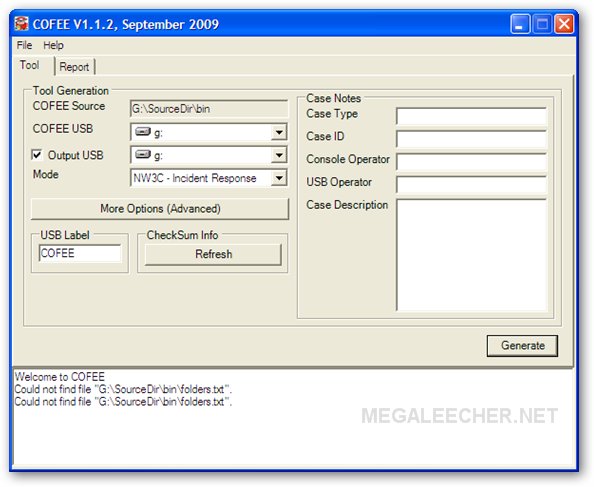
COFEEAs quite expected Microsoft's automated computer forensic utility COFEE (Computer Online Forensic Evidence Extractor) meant for law-enforcement agencies got leaked on internet and is now readily available on torrent portals and file-sharing websites.


These Are The First EXCLUSIVE Images Of COFEE Utility

Computer Online Forensic Evidence Extractor

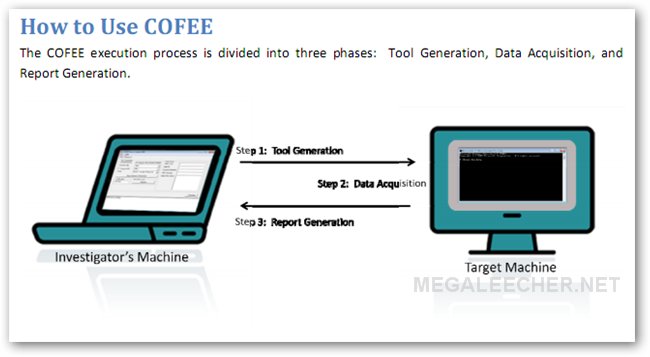
How Cofee Works


The utility is designed EXCLUSIVELY for crime-investigators allowing quick and fully-automated extraction of forensic data from computers suspected of containing criminal activity evidence letting investigators search through data on-site, the utility is provided for free by Microsoft to law-enforcement agencies world-over in a USB device which executes more then 150 commands to collect forensic data offering features such as the ability to decrypt passwords, search the computer's Internet activity, and analyze the data stored on it even including the data stored in volatile memory.


read more

Vodafone Egypt: HTC Magic with Android 1.5

Recently Vodafone Egypt has announced its superiority to bring an Android device into Egypt for its lovely customers ;) This device is the neat HTC Magic in its white suit.
Details of the offer can be found on Vodafone website, including the specs of the phone...

By nature everything has advantages and disadvantages... So let's start by.... mmmm, ok disadvantages first :) Here are the major disadvantages I encountered, it may differ for someone else ;) Even though they are listed as disadvantages, I don't have much blame for this..

  • Hmmm, How will I browse the application store (Android Market)?! I need to download applications from there to my phone.. Well, there should be an application called Market for this purpose. This is the official one by google. Unfortunately, this one is not there.... Don't despair, SlideME is here.. SlideME is a community for Android developers and is an Android Market too.. This phone is packed with SlideME application :)
  • 3G connection and WiFi are really working great.. The problem is, WiFi only works with networks conducted through a router or an access point. Adhoc networks aren't that easy :( I couldn't connect to an Adhoc wireless network at home.. Searching the web, I found a way through.. but it requires me to root my phone!! May be later I'll find an easier way, but it'll stays a limitation till then.
  • I've been told while buying that it is locked for Vodafone network.. I can't testify this fact, I only have a Vodafone SIM card :)
  • You can use bluetooth to connect your mobile to a headset, but not for data transfer.. It's not that bad, you actually get a USB data cable with the phone... You can use it for this purpose, or for debuging your own developed applications on the phone ;)

However, you can overcome some of these disadvantages by giving up your warranty and start doing some hacks to root your device (i.e, gain a root access) which will enable you to install more applications, flash a new Android image to your device, or even more; You're the master then ;) This one itself is a big advantage,
your limits are the hardware.. You can play with the software as you like, even the OS “It's open sourced ;)”

I didn't build an enumerated list for advantages, but this HTC Magic is really doing great.. It's fast performing, it has google apps (gmail, gtalk, maps) installed.. You can use GPS or Wireless Networks for determining location.. Connect to the internet through 3G or a WiFi connection.. Enjoy 3.2MP camera with auto focus and video capture abilities.. Synchronize your contacts, mail and calendar with google account.. Customize it and make it yours.. Download and install applications for free from the Market.. Or even develop your own applications.. Enjoy working with the touch screen.. There is more for this list :)

Really, I'm loving it ;) Check videos on YouTube for more demos :)

Monday, November 2, 2009

Ubuntu Upgrade.. Easy as a Click

Yes... It's just few clicks to upgrade your current version of Ubuntu to the newest version Ubuntu 9.10 which is given the name 'Karmic Koala'

As stated on Engadget.. This new version is featuring a faster graphical boot sequence (no more scary text scrolls), a revamped audio framework that improves sound control across multiple applications, and a new Software Center that visually simplifies the Add/Remove Applications tool. Firefox 3.5 also comes with this upgrade...

Upgrading is really easy. The time it takes just depends on your internet connection. Just open the update manager from the system menu...

Near the top, you'll get a new release notification.. Click the Upgrade button and follow the instructions.. You'll reach soon :)


The coolest thing is you can still use your computer while the upgrade is in progress.. I still had my browser opening many tabs, my chat client is still working showing my buddies, a song is playing...etc You don't have to take your work off for the upgrade.. You will only need to restart when it's done..

Have Ubuntu 9.10? Enjoy... Older version? Go upgrade... Don't? Go get it and enjoy Linux for human beings :)

P.S. I made the upgrade from Ubuntu 9.4

Tuesday, October 6, 2009

Web Browsers for Dummies

Considering the amount of time everyone spends online today, it is funny that many people still don't know what a web browser is, even though they use it every day.

The following video is a questionnaire conducted by Google while promoting their browser Chrome, and it shows that many people don't know what a browser is, or they confuse a browser with a search engine. Only a few people answered correctly.


It also seems that Google is determined to educate people on what a browser is. The latest post on the Official Google Blog has a quick comparison showing that people spend way more time on the web than they spend in their car. However, they are more likely to know which car they are driving than to know which browser they are using.

The author of that post, Jason Toff, created a small video clip explaining what a browser is. It is intended for those who know almost nothing about the computer's technical terms. Take a look:


In addition, Toff has also created a simple site, WhatBrowser.org, that gives even more information about browsers. On this site, you can see which web browser you're using, explore links to browser diagnostic tests and read some useful tips for getting the most out of your browser.

So, do you know which browser you're using?

Monday, October 5, 2009

Paint.NET is a Quality Photo Editing App for Windows

Paint.NET is a Quality Photo Editing App for Windows: "

Looking for a quality all-purpose photo editing program for everyday use? Paint.NET is a free app which is a useful addition to your Windows system.


Installation


During the installation process you will have the opportunity to choose between a Quick Install and a Custom Install. In the same install window you will also be able to specify the language that best suits your needs. Both options are very nice to have. You should also make sure you have the Microsoft .NET Framework installed first, but if you don’t the installer will direct you to the site to download it.


Note: Custom Install setup shown here.


paint-01


Along with being able to choose the install directory of your choice, you will also be able to make selections for image defaults, creating a shortcut on your Desktop, and two types of automatic updates to check for.


paint-02


Before the install process begins Paint.NET will create a restore point.


paint-03


Paint.NET will also work to optimize performance for working on your system…yet another nice feature.


paint-04


Paint.NET


Once you have finished the installation and started Paint.NET, this is what it will look like. Except for the floating toolpad, everything else is at the top giving Paint.NET a nice uncluttered look.


paint-05


Menu Set for Paint.NET


Time for a good look at the menus available for Paint.NET. Here you can see the File, Edit, View, and Image Menus…


paint-06


Followed by the Layers and Adjustments Menus.


paint-07


And finally the Effects, Window, and Help Menus.


Note: Notice the pre-plugin look of the Effects Menu…it will not be a small menu for long!


paint-08


Plugins


Plugins are one of the terrific things about Paint.NET…choose only what you like (or need). Once you have the zip files for the plugins that you choose downloaded and unzipped, simply place them in the “Effects Folder” and restart Paint.NET. Everything will automatically be ready to go!


Note: The link for the plugins repository is provided at the bottom of the article…


paint-09


And here is our Effects Menu after we added in our favorite plugins. The Main and Sub Menus are filled with lots of picture modifying goodness now (very nice).


paint-10


Paint.NET in Action


For our example we decided to crop an area out of a larger picture. Using the “Rectangle Select Tool” from the floating toolpad, we focused on the girl in the center of the picture. Notice the slight change in color and nice dotted outline marking the exact area selected…then all that we had to do was go to the “Edit Menu” and use the “Copy” & “Paste in to New Image” commands.


paint-11


And there is our new cropped image…all ready to save and/or modify further.


paint-12


Conclusion


If you have been looking for a free all-purpose photo editor that is very dependable and useful to have around, then Paint.NET is a program that you should definitely have installed on your system.


Links


Download Paint.NET (version 3.36.3158.38068) – Stable


Download Plugins for Paint.NET (Listed as A-L & M-Z)


Works On: Windows XP (SP 2+), Windows Vista, Windows 7, Windows Server (2003 SP 1+)


This article from : How-To Geek